Ambysto Gate
See who connects. Decide per app. Undo anything.
Every app on your Mac, where it goes, and how much it sends. Allow or block, one app at a time. Nothing is blocked until you say so. Every rule change is kept. Step back one change, or to any earlier point.macOS 14 or later · Apple Silicon and Intel · menu bar app
It watches before it asks.
A new firewall that asks about everything on day one teaches you to click Allow without reading. Gate starts quiet. For the first 7 days it lets everything through and builds a picture of what your apps actually do.
- WatchConnections go through. Each one is recorded in Activity: the app, the destination, the port, the bytes.
- SuggestFrom what it saw, Gate proposes allow rules for the apps you already use. It never proposes a block. A suggestion does nothing until you accept it.
- AskWhen the week ends, you choose: review the suggestions and switch to Ask, switch now, or keep watching. Pick 0 to 30 days at setup.
One small window. Everything you need to answer.
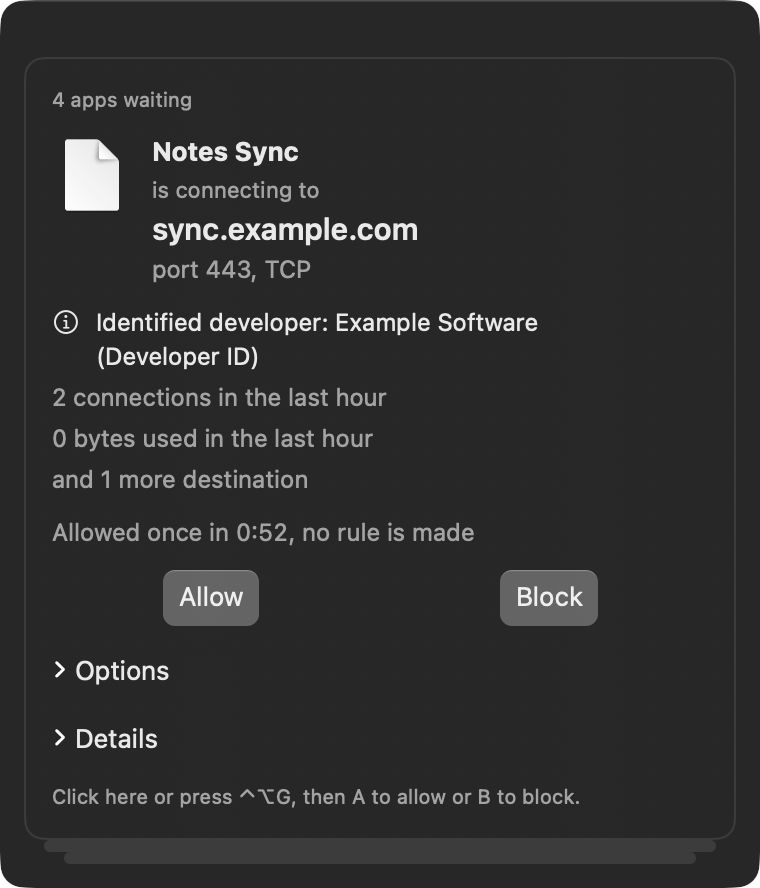
In Ask mode, a new connection waits while Gate asks you. The prompt says who is connecting, where, and how the app is signed. It never steals focus from what you are typing.
- Who and where. The app, the destination name when macOS provides one, the port and protocol.
- How it is signed. Apple, an identified developer, or unsigned. Rules follow the signature, so they survive updates and moves.
- For how long. This connection only, until the app quits, always, or until a time you pick.
- Keyboard first. Press ⌃⌥G, then A to allow or B to block.
- Never stuck. No answer in 60 seconds? The connection is allowed once, Gate stays quiet about that app for 10 minutes, and marks it for review.
Three modes. Your rules apply in all of them.
A block rule blocks in every mode. The mode only decides what happens to a connection that no rule covers yet.
Watch
Default for the first 7 days
New connections go through and are recorded. Gate builds its suggestions.
Ask
After Watch, when you agree
A connection with no rule waits for your answer. Apple-signed apps and apps you had before Gate are trusted by default, so the questions are about what is new.
Lockdown
Off until you turn it on
Only what you already allowed gets out. Before it starts, Gate lists the apps that would lose their connection, so you can keep the ones you need.
Pause from the menu bar for 15 minutes, an hour, or until you turn Gate back on.
Built not to break your Mac.
A network filter sits in the path of every connection. Gate is written around that responsibility.
What Gate does
- Lets it through when unsure. If Gate cannot decide safely, the connection goes through and Gate tells you.
- Keeps macOS working. System services are recognised and allowed, in every mode.
- Journals every change. Undo the last change, or restore the whole rule set to an earlier point.
- Guards its own rules. Saves are atomic. A damaged rule file is replaced by the last good copy, never silently emptied.
- Says what it cannot see. Some macOS traffic never reaches any third-party filter. Gate says so where it matters.
What Gate never does
- Read what your apps send. It decides on the app and the destination, nothing inside the traffic.
- Read your DNS replies, or act as a VPN, proxy or DNS server
- Check addresses online by itself. A look-up runs only when you press its button.
- Scare you. No red alerts, no countdowns, no alarming words.
- Send anything about you off your Mac. No account. No telemetry.
Your own network, in plain words.
My network shows each interface and its addresses, your router, the DNS servers your Mac uses and who set them, and whether a proxy is on. Nothing leaves the Mac to show it.
- ActivityLive list of connections with the decision and the reason for it. Bytes per app.
- Public addressSee the address the internet sees, when you press Look up.
- Public listsCheck what public lists say about an address. Off until you read what is sent and to whom. A result is shown, never acted on.
Free controls your network. Forever.
Pro adds history and conveniences. We only charge when you are happy to pay.
Free
$0 foreverEverything you need to see and decide.
- Watch, Ask and Lockdown
- Rules per app, with built-in trust
- Live Activity, 24 hours of history
- Undo the last change
- My network and look-ups you start
Pro PRO
$19.99 one-timePay once, only if you're happy with what Gate does:
- 30 days of history with top talkers
- Block and allow lists, local or from a URL
- Timed rules: allow until a clock time
- Full journal: restore to any earlier point
- Export and import your rules
- Steady link: which apps used the bandwidth when the connection got worse
No subscription, no auto-renewal, no nag screens. Full refund within 14 days of purchase. The key is checked on your Mac, offline. Going back to Free keeps your Pro rules stored; they just stop applying.
Questions
What does setup ask of me?
Two macOS approvals: allow Gate's network extension, then allow content filtering. Gate walks you through both and shows the live state of each. It never claims to be on when it is not. It runs from the Applications folder.
Will it slow my connection down?
Gate decides once, when a connection starts, not per packet. Its target is under 5 ms per decision in the median, and about 1% CPU.
What if Gate itself stops?
Nothing hangs. A connection waiting on a prompt is allowed once and the app is marked for review. Quitting Gate stops filtering until your next login, after it asks you to confirm.
Does Gate send my data anywhere?
No. Your rules, Activity and journal stay on your Mac. Gate connects out only to check for updates, to fetch lists you add, and for look-ups you press yourself. The privacy policy lists each one.
Does it filter incoming connections?
No. Gate handles outgoing connections. macOS has its own firewall for incoming ones.
Other people use this Mac. What do they see?
Gate is set up once per Mac by one account. Other accounts see its status only, and their traffic is not filtered.
Is there a Windows version?
Planned. A native app, built from the same written spec. No mobile.
See what your Mac talks to.
Install it, approve it twice, and let it watch. Your first picture builds in the background.
macOS 14+ · Apple Silicon and Intel · Free